Teaching AI Coding Agents to Remember What It Does Over Time
AI coding agents are getting better at writing code, but they still tend to rediscover the same codebase knowledge across sessions.
AI Agents Keep Rediscovering Your Codebase
You ask an AI coding agent to add a new feature to a project it worked on yesterday. Today, it starts from scratch - exploring the repository structure, guessing at conventions, and re-learning patterns it already understood. Every session feels like the first session.
This isn't just inefficient. It's a fundamental mismatch between how agents work and how codebases evolve. Agents treat every interaction as a fresh encounter, while real development happens over time - iterative, incremental, and built on accumulated understanding.
What if an agent could remember what it learned about your codebase?
AI coding agents are powerful, but they're expensive to run. Every token spent re-exploring a repository is a token wasted. Worse, the larger the codebase, the more context is needed to understand it - and the more likely the agent will miss something important.
Dumping every file into an agent's context isn't the answer. Most files aren't relevant to the task at hand, and even if they were, the agent still has to interpret them - every time. This leads to:
- Repeated reasoning: The agent re-derives the same architecture, conventions, and patterns.
- Context bloat: Unnecessary files consume tokens and reduce focus.
- Loss of continuity: Knowledge from previous sessions disappears.
- Stale assumptions: The agent might rely on outdated understanding if the codebase changes.
What developers need isn't just access to source code - it's durable, verifiable knowledge about the codebase.
A Local Brain for Your Repository
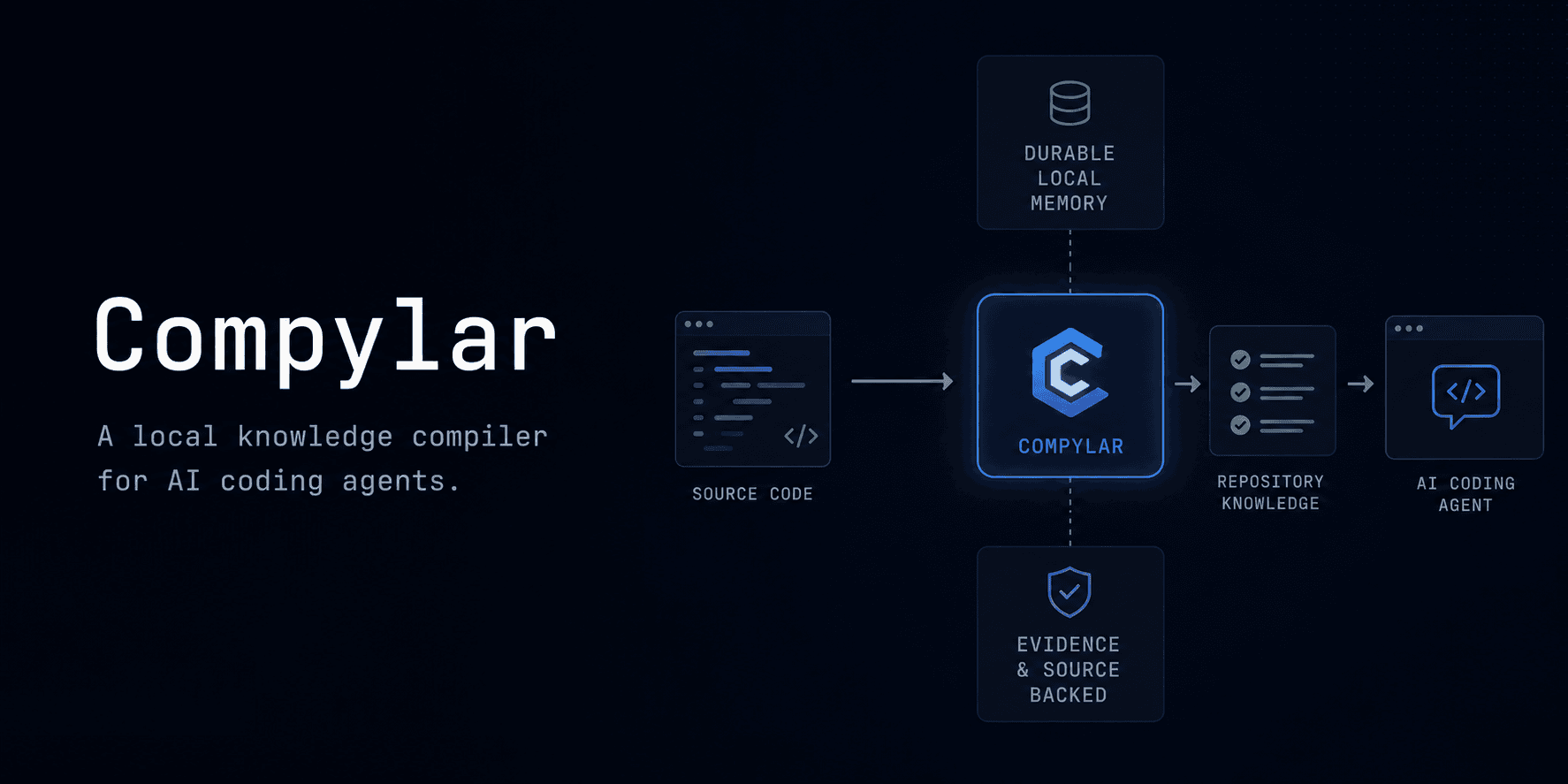
Compylar is a local Knowledge Compiler for AI coding agents. It analyzes a JavaScript or TypeScript repository, extracts evidence-backed facts, and stores them in a durable, queryable format. Agents can then retrieve targeted context for specific tasks, avoiding the need to rediscover the same information repeatedly.
The mental model used by Compylar
Source Code → Repository Facts → Evidence → Durable Knowledge → Task-Specific Context → AgentThis isn't just an index or a cache. It's a structured, verifiable representation of what the agent has learned about the codebase - backed by real source files and updated as the repository evolves.
Architecture Flow
Why "Evidence-Backed" Matters
Most AI tools treat repository knowledge as disposable. Compylar treats it as data - something that can be stored, verified, and invalidated when it becomes stale.
If an agent infers that "this project uses React hooks for state management," that knowledge is only useful if:
- It's true.
- It's traceable back to the source files that support it.
- It's updated when the codebase changes.
Without evidence, knowledge becomes a liability. Agents might rely on incorrect or outdated assumptions, leading to bugs or wasted effort.
How Compylar Handles Evidence
Compylar stores facts with references to the source files that support them.
- Fact: "This project uses React hooks for state management."
- Evidence:
src/components/Dashboard.tsx(lines 12-45),src/hooks/useAuth.ts(lines 8-20).
For example, when an agent records a finding, it writes a structured entry to Compylar's memory:
{ "id": "find-102", "kind": "convention", "summary": "This project uses React hooks for authentication state management.", "authority": "agent", "sources": [ { "path": "src/hooks/useAuth.ts", "startLine": 8, "endLine": 20, "sourceHash": "a1b2c3d4e5f6g7h8..." } ], "confidence": "high", "state": "current"}If those files change, their SHA-256 hashes will mismatch. The fact is flagged as potentially stale during status checks, prompting a re-verification or invalidation.
How Compylar Compares to Vector Search & RAG
| Capability / Feature | Generic Vector RAG / Chat Indexing | Compylar Local Repository Brain |
|---|---|---|
| Primary Output | Embeddings / Unstructured Text Chunks | Structured JSON Facts, Symbols, Routes, & Memory |
| Evidence Link | Loose vector proximity (approximate) | Precise file and line citations with SHA hashes |
| Staleness Handling | Expensive re-embedding of entire workspace | Incremental delta re-verification based on changed files |
| Privacy / Cost | Cloud-based APIs (token fees) | 100% Local-first, zero cloud token overhead |
| Agent Support | Requires custom API integration | Built-in CLI & skill triggers for Claude Code, Cursor, Codex |
| Convention Tracking | Missing unless manually prompted | Automated and agent-learned RULES.md generation |
The Core Workflow
1. Bootstrapping the Project
For a fresh onboarding, you establish a local baseline index first:
compylar bootstrap .This creates the initial .compylar/ workspace. The compiler will prompt your agent to perform an onboarding scan to build out detailed semantic details.
2. Compiling the Repository
Once the baseline is set up, run compile to run deterministic parser passes (resolving TS/JS symbols, routes, and model definitions):
compylar compile .This generates a .compylar/ directory containing:
config.json: Configuration for source extensions and analyzer limits.brain.json: The fully compiled structured database containing all facts, exports, imports, and route maps.brain.db: An SQLite database that stores historical snapshots of compile runs.brain.md: A readable markdown summary report of the repository state.
3. Checking Status
As you make changes, verify whether the agent's memory is out of sync:
compylar status .This outputs:
- Which facts are fresh (unchanged since last analysis).
- Which facts are stale (source files have changed).
- Which facts are invalid (evidence no longer supports them).
4. Generating Task-Specific Context
Instead of dumping the entire repository into the agent's context, Compylar generates targeted knowledge for a specific task:
compylar context "Add a new API endpoint for user activity" .This retrieves:
- The project's API routing conventions.
- The request/response schema patterns.
- The authentication middleware used.
- The location of existing API endpoints.
5. Refreshing Knowledge
When the codebase changes and compylar status reports stale files, run refresh to update only the changed files - reusing the analysis of unmodified files:
compylar refresh .6. Recording Learned Findings
When your agent uncovers a new pattern or convention during implementation, it writes it to the brain so it doesn't have to rediscover it tomorrow:
compylar learn "Redux toolkit slices must be located in src/features" --kind convention --source src/store.ts:10-25If you make a human-authoritative decision, use remember instead:
compylar remember "We migrated database drivers from pg to postgres-js" --kind decisionAdding a Feature
The Task
"Add an activity timeline to the dashboard using the existing project patterns."
Without Compylar
- The agent explores the repository structure.
- It searches for dashboard components.
- It infers the project's state management pattern.
- It guesses at the styling conventions.
- It implements the feature, possibly missing key details.
With Compylar
- The agent retrieves targeted context:
- It inspects only the relevant files.
- It implements the feature, confident it aligns with the project's patterns.
- It updates Compylar's knowledge if it discovers new conventions.
The difference isn't just speed - it's continuity. The agent isn't starting from scratch. It's building on what it already knows.
Why Local-First?
Compylar runs entirely locally. There's no cloud dependency, no API calls to a third-party service, and no risk of exposing proprietary code.
Why This Matters
- Privacy: Your code never leaves your machine.
- Reproducibility: Analysis is deterministic and version-controlled.
- Reliability: No network latency or service outages.
- Cost: No token overhead for re-analyzing the same files.
- Control: You decide when and how to update knowledge.
This doesn't mean AI enrichment is off the table. Compylar's design allows for optional model-assisted analysis where needed - but the core workflow is local and deterministic.
What Compylar Sacrifices
No architecture is perfect. Compylar makes deliberate tradeoffs to prioritize durability, verifiability, and local control.
1. Stale Knowledge
- Problem: If the codebase changes, some facts may become stale before the next
refresh. - Compylar's Approach: Facts are timestamped and hashed. Stale facts are flagged and can be re-verified.
- Tradeoff: The agent might occasionally rely on outdated knowledge, but it's always aware of the risk.
2. Storage Overhead
- Problem: The
.compylar/directory adds storage overhead. - Compylar's Approach: Facts are stored as structured JSON, and historical snapshots are kept in a compressed SQLite database.
- Tradeoff: The overhead is minimal, but it's not zero.
3. Synchronization
- Problem: Keeping knowledge in sync with the codebase requires manual
refreshcalls. - Compylar's Approach: Git hooks or file watchers could automate this, but Compylar currently leaves it to the user.
- Tradeoff: Manual control reduces complexity but adds a small maintenance burden.
4. Repository-Specific Conventions
- Problem: Every codebase is different. Compylar's analysis is generic by default.
- Compylar's Approach: Users can define source-backed project rules (e.g., "All API routes must validate input with Zod").
- Tradeoff: Custom rules require upfront effort but pay off in accuracy.
5. Onboarding Cost
- Problem: Compylar adds a step to the agent workflow.
- Compylar's Approach: The CLI is designed to be simple (
bootstrap,compile,context,refresh), but it's still a new tool to learn. - Tradeoff: The upfront cost is outweighed by long-term efficiency gains.
6. Language Support
- Problem: Compylar currently supports only JavaScript and TypeScript.
- Compylar's Approach: The architecture is language-agnostic, but analysis is tailored to JS/TS.
- Tradeoff: Expanding to other languages would require significant work.
7. False Confidence
- Problem: Agents might over-rely on Compylar's knowledge, assuming it's always correct.
- Compylar's Approach: Facts are evidence-backed, not truth-backed. The agent is encouraged to verify critical assumptions.
- Tradeoff: This is a cultural shift - agents must learn to treat Compylar as a source of context, not a source of truth.
What I Learned Building Compylar
1. Evidence Is Harder Than It Looks
Early versions of Compylar stored facts without evidence. This led to a critical problem: how do you know if a fact is still true? Without evidence, facts become stale silently. Adding evidence tracking was a game-changer - but it also doubled the complexity of the analysis pipeline.
2. Staleness Detection Is a Moving Target
I initially thought file hashes would be enough to detect staleness. They're not. A fact might depend on multiple files, and a change in one file might not invalidate the entire fact. Compylar now tracks dependencies between facts and files, which adds overhead but improves accuracy.
3. Agents Need "Soft" Knowledge
Not all knowledge is binary (true/false). Some facts are probabilistic (e.g., "This project probably uses React hooks"). Compylar now supports confidence levels for facts, which helps agents decide how much to rely on them.
4. Local-First Is Liberating
I considered building a cloud version of Compylar early on. But keeping it local-first simplified everything - no auth, no scaling, no privacy concerns. It also forced me to optimize for deterministic analysis, which turned out to be a strength.
5. The Hardest Part? Deciding What to Store
The temptation is to store everything. But every fact adds overhead. I had to ask: Is this fact useful enough to justify its cost? For example, storing "this file exports a React component" is useful. Storing "this file has 42 lines of code" is not.
6. Agents Still Need to Think
Compylar isn't a replacement for an agent's reasoning. It's a force multiplier. The best results come when agents use Compylar's knowledge as a starting point, then verify and refine it.
Where This Could Go
Compylar is a first step toward durable repository knowledge for AI agents. Here's where it might go next:
1. Deeper Repository Graphs
Right now, Compylar stores facts as a flat list. A graph of facts (e.g., "this component depends on this hook") could enable richer context retrieval.
2. Stronger Semantic Retrieval
Compylar's current retrieval is keyword-based. Semantic search (e.g., "find all components that manage user state") could make context generation even more precise.
3. Richer Dependency Understanding
Compylar could track logical dependencies (e.g., "this function is called by these three components") in addition to file dependencies.
4. Better Memory Invalidation
Right now, staleness detection is file-based. Change-aware analysis (e.g., "this function's signature changed, so all callers are now stale") could reduce false positives.
5. Multi-Language Support
The architecture is language-agnostic, but the analysis is JS/TS-specific. Expanding to Python, Go, or Rust would require new parsers and fact extractors.
6. Team/Shared Repository Memory
Compylar is currently single-user. A shared "brain" for a team could enable collaborative knowledge building - but this introduces sync challenges.
7. Benchmarking
How do you measure the effectiveness of durable knowledge? I'd love to see benchmarks comparing agent performance with and without Compylar across real-world tasks.
The Bigger Idea
AI coding agents don't just need better access to source code. They need better ways to retain, verify, and retrieve what they've already learned about the software they're working on.
Compylar is one approach to that problem. It's not perfect - it makes tradeoffs, it has limitations, and it's still evolving. But it's a step toward treating repository knowledge as data, not disposable context.
If you're working with AI coding agents, give it a try:
And if you're building something similar - or just thinking about the problem - I'd love to hear from you.